POP3 vs IMAP in Outlook for G Suite – Which Should You Use?
Choosing the right email protocol for Outlook with your G-Suite (Google Workspace) account can make a big difference in how your business handles emails. Whether you’re accessing messages on one device or syncing across multiple, understanding POP3 and IMAP helps you decide what’s best for your workflow.
In Bangladesh, where many companies rely on Outlook for professional communication, knowing how these two protocols work ensures a smooth and reliable email experience.
At Unitech BD Software – a leading Google Workspace (G Suite) reseller in Bangladesh — we help businesses configure, secure, and manage their Outlook email systems for optimal performance.
What Is IMAP?
IMAP (Internet Message Access Protocol) keeps your emails stored on the G-Suite (Google Workspace) mail server and syncs them across all your devices — computer, phone, or tablet.
When you read, delete, or reply to a message in Outlook connected to G Suite, the changes reflect everywhere instantly.
Use IMAP if you want to access your G Suite emails from multiple devices without losing them.
✅ Advantages of IMAP in G-Suite:
- Syncs G Suite email in real time across all devices.
- Keeps a copy of emails safely on the G Suite server (secure and backed up by Google).
- Ideal for teams or users who check G Suite email from multiple devices.
- Allows viewing only headers before downloading full messages — saves bandwidth.
⚠️ Limitations of IMAP in G-Suite:
- Requires an internet connection for full access.
- Uses more server storage, which might fill your G-Suite mailbox faster.
- Slightly more complex configuration for some users compared to POP3.
- Your email is backed up on the server. If a device is lost, your mail is safe and can be accessed from another device.
What Is POP3?
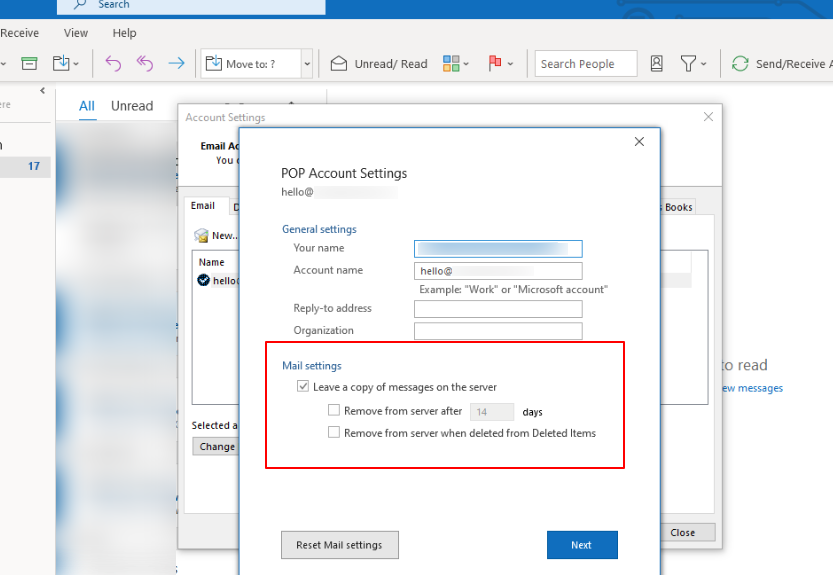
POP3 (Post Office Protocol v3) downloads your G-Suite (Google Workspace) emails from the server to your device and can remove them from the server afterward.
Emails are stored locally on your computer or phone, meaning they aren’t synced across other devices.
Use POP3 if you access your G-Suite email from a single device and want messages removed from the server after downloading (though this setting can often be configured. You can that setting in the below image).
✅ Advantages of POP3 in G-Suite:
- Ideal for users who use only one device (like a single office computer).
- Frees up G Suite server space since emails are downloaded and stored locally.
- Accessible offline — once downloaded, you can view old emails without internet access.
⚠️ Limitations of POP3 in G-Suite:
- No syncing — if you delete or send an email on one device, it won’t reflect on others.
- Risk of email loss if your device crashes and you haven’t backed up your data.
- Not ideal for business users who access their G Suite account from multiple devices (desktop, laptop, or mobile).
- If your hard drive fails and you don’t have a separate backup, you could lose your emails permanently.
Note: To learn how to set up your Google Workspace (G Suite) email in Outlook using POP3 in Bangladesh, check out this detailed guide.
Not sure which protocol suits your business best?
Talk to our experts at Unitech BD Software — we’ll help you choose the right setup for your Google Workspace and Outlook integration.
POP3 vs IMAP: Key Differences
| Feature | POP3 | IMAP |
|---|---|---|
| Email Storage | Downloads to your device | Stays on the server |
| Sync Across Devices | ❌ No | ✅ Yes |
| Internet Required | Only for new mail | Needed for all syncing |
| Server Space | Frees server space | Uses server storage |
| Offline Access | Full | Limited |
| Ideal For | Single-device users | Multi-device users & teams |
Based on these differences, you can select either the POP3 or IMAP protocol for your Google Workspace (G Suite) email setup in Dhaka, Bangladesh.
Recommended Settings for Outlook with G Suite:
| Protocol | Incoming Server | Port | Security | Outgoing Server | Port | Security |
|---|---|---|---|---|---|---|
| IMAP | imap.gmail.com | 993 | SSL | smtp.gmail.com | 465 or 587 | SSL/TLS |
| POP3 | pop.gmail.com | 995 | SSL | smtp.gmail.com | 465 or 587 | SSL/TLS |
For G Suite (Google Workspace) users in Bangladesh, IMAP is the clear winner.
It provides flexibility, synchronization, and reliability — essential for modern business communication through Outlook.
If your organization operates on a single system and prefers keeping local archives, POP3 can still serve well.
But for scalability, shared access, and smoother operations — choose IMAP.
Need help getting started? We’ve got you covered!
Unitech BD Software is a trusted Google Workspace (G Suite) reseller in Dhaka, Bangladesh.
We help businesses across Bangladesh set up and manage their Google Workspace and Outlook email systems for secure, professional communication.
Ready to protect your data – without the complexity?
👉 Contact Unitech BD Software today to learn about our Google Workspace services!
Phone: +88 02 48956492
Cell: +88 01782 656 388
Email: info[at]unitechbdsoft.com
🏢 Office Address: Plot #87, BNS Center (4th floor), Suite No. #507/A, Dhaka – Mymensingh Highway, Sector #07, Uttara Model Town, Dhaka-1230, Bangladesh.
For more info visit: https://unitechbdsoft.com/google-email-services-dhaka-bangladesh.php